
Writing a stopwatch and rounds counter mobile app with React Native
January 14, 2020 [ ReactNative Mobile Projects ]

In a gym I’m often need to track time of the exercise I’m doing. Rest time between the exercises and how many rounds I have completed already. The screen should be always awake while the app is running.
Imagine the following scenario:
- click start, then do exercise for 1 minute time or 10 reps
- then hit stop and rest for few minutes
- awesome, you did one round, now repeat
If you search for the ‘stopwatch’ or ‘fitness timer’, etc. in the GPlay/iStore you will definitely find many apps that doing this. But:
- All of them free one) contains ads
- They are always slightly different from what I actually need
- We are developers! We could write our own!
Mobile development and the native approach
Every operation system has it’s own set of APIs available that are allowing to access a device resources. This is not an exception for the two most popular mobile operating systems - Android and iOS.
If you want do develop for Android - welcome to the Java world (or Kotlin)! Do you want to create nice UI? XML if your friend. So almost nothing in common with the web development ( except XML part :) ).
At the iOS side everything is the same except that instead of Java you will need to learn Swift and Swift UI.
If you are wanted to a get large audience you need to develop an application literally twice just to cover two major platforms! There are two completely separate worlds that are in separate universe and we with our web development are in our own universe.
So how could we join them together?
Joining the web development and the mobile development together
People are not stupid (at least not all of them), no one’s wanted to do the same work twice. So what if we could grab the existing web apps and runs them on the phone? What do we need? Right, another level of abstraction.
The app written with web technologies are called Hybrid and could be divided into two type groups.
Type group #1: Hybrid-Native apps
In this case our level of abstraction contains bindings to the native functions.
- Hybrid-Native frameworks are ReactNative, Xamarin, NativeScript, Flutter. They are all have it’s own interlayer to communicate with a mobile OS. As an example ReactNative creates a JavaScript bindings to native api to make js interface available from outside.
Type group #2: Hybrid-Web apps
- Hybrid-Web frameworks uses a WebView as interlayer (we could simple said Chrome :) as an example framework would be Ionic or PhoneGap.
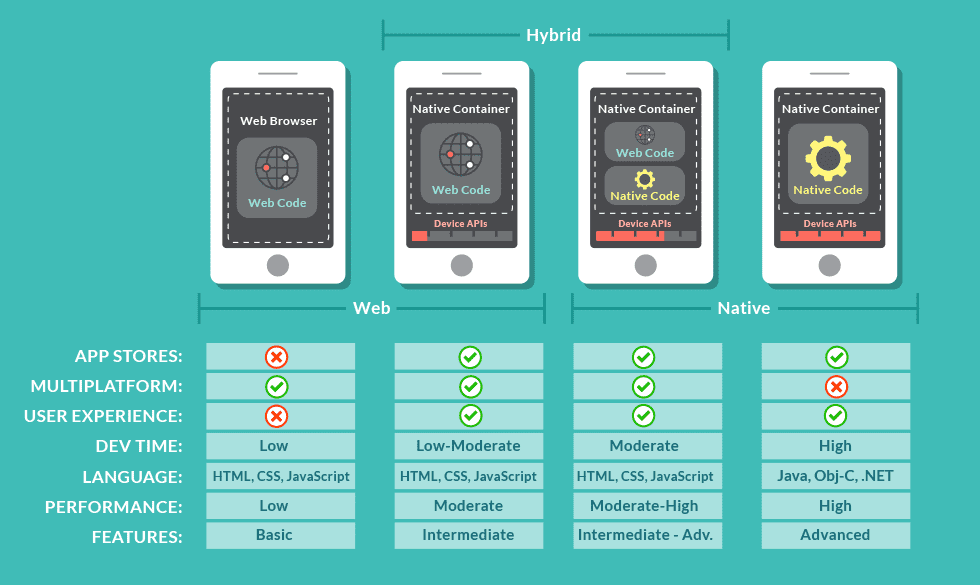
No matter what type of a hybrid app you will choose for development there some benefits and downsides.
The main benefits in comparison with a native app are:
- An ability to write an app ones. This gives a lot of other benefits like one code base, reduced cost of maintenance and development.
- Allows us to use already known tools and approaches.
- An app would be available would at the app store as native app.
Downsides are:
- Hard to customize
- Always be slower than a native app
Writing code with React Native

I’m picked ReactNative because this one is closest to us - web developers. It uses JavaScript and React so no problems with that.
We are going to build a stopwatch that could count rounds. This is how the working app looks:
I’m not going deep into the code, you could go through one at github:
https://github.com/slavik925/wrtimer
Prerequisites or how to start
First you need to setup an environment.
I’m highly recommend you to start from the React Native getting started guide: https://facebook.github.io/react-native/docs/getting-started
Initiating a new React Native project with typescript support:
npx react-native init AwesomeTSProject --template react-native-template-typescriptI suggest you to install Android SDK with the Android Virtual Device (AVD). You will need it later to build a release version of an app.
To run the app run:
npx react-native run-androidApplication details
There are only two important files for us:
- https://github.com/slavik925/wrtimer/blob/master/useStopWatch.tsx (useStopWatch react hook)
- https://github.com/slavik925/wrtimer/blob/master/App.tsx (contains all the logic)
...

const App: React.FC = () => {
  useKeepAwake();

  const { start, stop, times } = useStopWatch();
  const [rounds, setRounds] = useState(0);
  const [appState, setAppState] = useState(StopWatchState.INITIAL);

  return (
    <TouchableHighlight onPress={toggleAppState(appState, setAppState, setRounds, start)} underlayColor="white">
      <View style={{ ...styles.container, backgroundColor: getColor(appState) }} >
        <View style={styles.topBar}>
          <TouchableOpacity onPress={BackHandler.exitApp}>
            {IconPowerOff}
          </TouchableOpacity>
          <TouchableOpacity onPress={stopAndReset(setAppState, setRounds, stop)}>
            {IconRefresh}
          </TouchableOpacity>
        </View>
        <View style={styles.stats}>
          <Text style={styles.stopwatchTextMedium}>Round: {rounds}</Text>
          <Text style={styles.stopwatchText}>{format(times)}</Text>
          <Text style={styles.stopwatchStatus}>{getStatusText(appState)}</Text>
        </View>
      </View>
    </TouchableHighlight>
  );
}

...
I’m using keepAwake hook to prevent the screen off while the app is running.
import { useKeepAwake } from "expo-keep-awake"Building and installing a release version
It’s time to deploy our app to a phone. There is no reason to deploy it to store so all I want is to build an apk file and install it directly.
Here we go:
Step 1: Building a release version of our app
$ cd android
$ ./gradlew bundleRelease
After this you could find generated ABB here
android/app/build/outputs/bundle/release/app.aab
Step 2: Create an APK file
bundletool will help us - https://github.com/google/bundletool
java -jar bundletool-all-0.12.0.jar build-apks --bundle /Users/me/projects/wrtimer/android/app/build/outputs/bundle/release/app.aab --output=/Users/me/projects/wrtimer/android/app/build/outputs/bundle/release/wrtimer.apksStep 3 Install APK to your phone
Connect you phone with debug mode enabled and run:
sudo java -jar bundletool-all-0.12.0.jar install-apks --apks=/Users/me/projects/wrtimer/android/app/build/outputs/bundle/release/wrtimer.apksIn case you wanted to try here you go a release version:
https://github.com/slavik925/wrtimer/blob/master/wrtimer.apks
Conclusion
Writing a mobile application nowadays is much easier and entry threshold especially for web developers is low.
By using hybrid frameworks it’s possible to write one app that runs on every major platform. Of course this is not something super new but in the current time this technologies are solid and proven to be production ready.